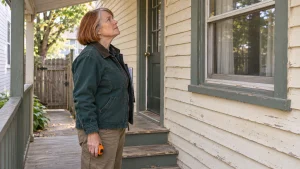
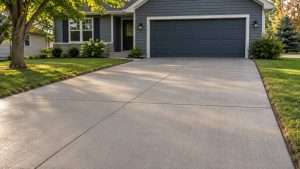
“We’d like to widen our driveway. It’s about 12 by 40 feet.” Picture the estimator opening that concrete estimate request. Did the homeowner measure the driveway they have or the strip they want to add? If your office records 480 square feet of new concrete, a perfectly reasonable answer has already turned into the wrong job.
A homeowner can usually point to what they want changed. Your website has to preserve that distinction until the person who calls them back can see it too. Work through the two sample requests below with someone who answers your phones. Then use the Concrete Estimate Request Worksheet to check one of your own inquiries.
Key Takeaways
- Ensure homeowners clearly specify what they want in concrete estimate requests to avoid misunderstandings.
- Separate photos depicting the site from those showing desired finishes to give estimators clear context.
- Ask targeted questions about what to keep or remove before discussing dimensions for better clarity.
- Use well-defined labels and instructions in your forms to streamline the information gathering process.
- Test the effectiveness of your inquiry intake to ensure estimators receive all necessary details from customers.
Ask what stays before you ask how big the job is
Start with a question a homeowner could answer while standing at the kitchen window. “What would you like us to remove, keep, or add?” A customer who answers “Keep the driveway and add room on the passenger side” has already given your estimator a better starting point than a dropdown labeled “Residential flatwork.”
Carry that answer forward. If someone selects “Widen an existing driveway,” the next label can say “About how wide and long is the strip you want to add?” Under it, give a simple example such as “About 3 feet wider for the 30 feet between the garage and the walk.” Allow “I haven’t measured.” Someone looking at an irregular edge may be able to describe exactly where the work begins and ends without being able to put a number on it.
A replacement request needs a different prompt. “Which sections would you like removed?” makes room for the homeowner who wants two cracked panels replaced and the homeowner who wants everything from the garage to the sidewalk taken out. If your company only takes full replacements, say so at that point. The concrete contractor website guide covers how to introduce those service limits before someone reaches the form.
Give each photo a job
Look at a driveway photo someone might text a friend. The concrete fills the frame. You can see its condition, but the edge the customer wants extended is just outside the picture. Asking for “more photos” may get you three more close-ups of the same crack. Ask for the missing view in words a customer can act on.
For a widening request, try “From a spot on your property, take one photo showing the driveway edge and the ground beside it where you want more room.” For a backyard patio, try “Show the path from the driveway to the patio area, including any gate or steps.” One wide view can explain why a side-yard entrance matters. Let the customer describe the route if they don’t have a photo handy.
Keep finish inspiration separate. A customer might upload a picture of a neighbor’s patio because they like the border. If the office receives a file labeled only “patio.jpg,” the estimator might assume it shows the customer’s yard. Put “Photo of my property” and “Example of a finish I like” beside separate upload controls, or invite a short description for each image. Pass those labels through to the office message.
Explain which files your form accepts and whether a photo is optional before the customer opens the file picker. Test the stated limits on a phone. The W3C guidance on form instructions illustrates how to make requirements and expected formats available alongside the fields where people need them.
Read a driveway widening request the way the office will
Suppose the message says, “Existing drive about 12 ft × 40 ft. Want three more feet along the garage side. Leave the old drive in place. Photo ends at the front walk.” You now know the customer expects the existing concrete to stay. You know which side they mean. You still don’t know whether the added strip runs the full 40 feet.
Here is a useful first reply. “I see the edge you want widened and that you plan to keep the existing drive. Should the new strip stop at the front walk, or continue past it?” That question gives the homeowner credit for what they already sent. They can answer it in a sentence. If they say the width changes near the walk, carry that note into the visit rather than asking them to calculate an irregular area.
Check your notification against the original entry. Does it say “Existing drive, approximately 12 ft × 40 ft,” or simply “Dimensions, 12 × 40”? Does a blank removal field appear as “No removal”? Those differences matter when another person picks up the request. Keep units, the name of the measured area, and any uncertainty beside the number. Leave a skipped answer visibly unanswered.
For a real example of setting expectations, CXS Concrete Solutions’ estimate form distinguishes approximate dimensions entered online from measurements confirmed in the field. If your site displays a calculated area, put the explanation next to the result. Keep the customer’s original dimensions in the notification so your estimator can see what went into the calculation.
Read a decorative patio request differently
Now try a second message. “We want to extend the patio out to the end of the deck. We like the stone border in the example photo. The side gate opens onto three steps.” This homeowner has identified a boundary, a design detail, and an access question without supplying a single measurement. Asking them to come back with square footage would put the least informative part of their request first.
Ask what they like about the reference. “Is it the border pattern, the color, or both?” Someone who likes a patterned border may want a plain center. The estimator can bring the right examples to the visit when the office records that detail. If the customer is undecided, keep their words and offer to show the finishes your company actually installs. A required dropdown that defaults to the first finish can turn an unanswered question into an apparent selection.
Access belongs in the visit notes. “Side gate, then three steps” tells the estimator what to inspect. It doesn’t establish equipment clearance. If your team needs to see that route regardless of gate width, arrange the visit and mention the steps in the appointment notes. Asking the customer to measure a gate first adds another exchange without changing your next move.
Decide who follows up and what they need
Give the person reviewing inquiries three choices. Call with one question when the answer changes which work the customer wants. Request one detail when a particular view or rough measurement would settle an issue and the customer can supply it easily. Arrange a site visit when the work fits your services and the remaining questions require someone to see the property. Assign an owner to the next action so the customer doesn’t hear the same question twice.
Match the confirmation to that process. If submitting the form puts the inquiry in a review queue, “We received your project details. Our office will contact you about the next step” sets a clear expectation. Save appointment language for the point when a date has actually been agreed. If a commercial bid with drawings lands in the residential queue, tell the customer who will review it according to your actual intake process.
Test the handoff with one request
Have a colleague submit the widening example from a phone. Give another colleague just the resulting notification and ask them to sketch what stays and what gets added. If they shade the entire driveway, check the dimension label and the notification template before adding more fields. Repeat with the patio example, omit the size, and see whether the finish photo and access note still reach the person making the call.
If nothing reaches that person, the contact form testing guide walks through the delivery check. Once the message arrives, judge it by a simpler test. Can the estimator open the conversation with a question about this property, or does the customer have to tell the whole story again?
Check your own concrete estimate request
Use the worksheet with one recent inquiry. Mark the work boundary, read the photos and identify the detail that changes the next action. Compare your answers with your estimator’s, then fix the first field that led you to different conclusions.
Get Your Free Concrete Estimate Request Worksheet
If you’d like a second set of eyes on the route from a project photo to an estimate request, Industry Ignitors can review your website and show you where a customer or estimator loses a useful detail.